The Private Identity & Document Studio.
Scan ID cards front-and-back on 1 page, auto-frame official passport photos, compress PDFs to exact portal limits (under 200 KB), and safeguard 2FA keys—with no accounts and zero document uploads. Free, supported by ads.
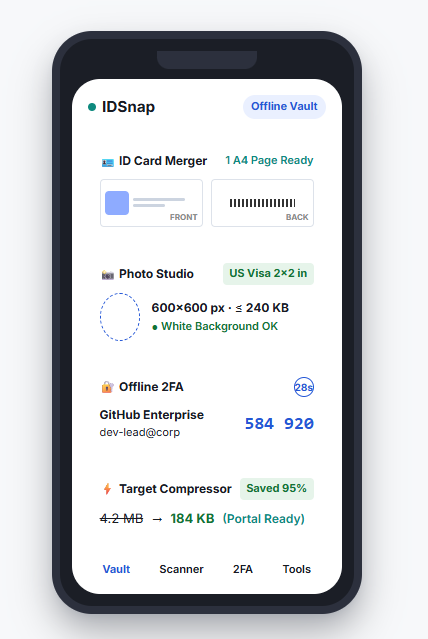
Seven Purpose-Built Tools in One Quiet App
Instead of downloading seven different adware-filled utilities, IDSnap combines all essential everyday document and identity tasks into a unified, local-first studio.
ID Card 1-Sheet Scanner
Snap the front and back of your driving license, national ID, or insurance card. IDSnap deskews both sides to ISO ID-1 actual size and aligns them on one A4 sheet with an optional purpose watermark.
Learn about ID card merging →Passport & Visa Photo Studio
Auto-crop portraits with biometric face guides. Supports 35×45 mm (Schengen, UK, India), 2×2 in (US Visa & Green Card), stamp sizes, and multi-copy 4×6 inch print sheet layouts.
Explore passport photo presets →Target-Size PDF Compressor
End the guesswork. Type your exact portal limit (e.g., "under 200 KB", "under 100 KB", or "under 50 KB"). Our binary-search compression engine hits your target while preserving sharp text legibility.
Try target compressor details →Exam & Application Kits
Pre-configured bundles for UPSC, SSC, US Visa, and college admissions. Prepares candidate photos (≤ 50 KB), cleans handwritten ink signatures (≤ 20 KB), and compresses certificates (≤ 200 KB) in one flow.
View pre-configured portal kits →Offline 2FA Authenticator
RFC 6238 TOTP authenticator with hardware-backed Android KeyStore encryption (AES-256). Features biometric lock, screenshot blocking (FLAG_SECURE), and a 30-second clipboard auto-purge.
See 2FA security architecture →Encrypted Document Vault
Organize IDs, diplomas, tax records, and medical files in structured, biometric-locked folders. Set validity dates to receive private local expiry reminders 30 days before renewal.
Explore vault folder templates →Private Document Scanner
Real-time automatic edge detection and perspective quad straightening. Includes shadow removal, high-contrast B&W filters, and offline OCR for Latin and Devanagari scripts with zero watermarks.
Read document scanner guide →Built for the World's Toughest Upload Portals
Government job portals, consular visa systems, and universities reject applications when dimensions or file weights are off by even a fraction. IDSnap is pre-tuned for both US and Indian standards.
UPSC, SSC, NTA & State PSC Portals
Candidate registration portals (UPSC OTR, SSC, JEE, NEET, Banking IBPS) enforce rigid, low file caps designed for legacy database pipelines:
- Passport Photo: 3.5 × 4.5 cm, strictly between 20 KB and 50 KB.
- Ink Signature: Thresholded ink on white BG, strictly between 10 KB and 20 KB.
- Certificate Proofs: Multi-page marksheet and caste PDFs strictly ≤ 200 KB or 300 KB.
- Aadhaar / Voter ID: Front and back merged on a single A4 page with anti-misuse purpose watermark.
US Visa DS-160, Green Card & Passport
The US Department of State and international embassies mandate strict photographic and geometric compliance:
- DS-160 Digital Photo: Exactly 2 × 2 inches (600 × 600 px up to 1200 × 1200 px).
- File Weight: Compressed JPEG strictly ≤ 240 KB.
- Biometric Head Ratio: On-screen oval guide ensures head height covers 50% to 69% of the frame.
- Printable Sheets: 4 × 6 inch photo studio sheets ready for Costco, Walgreens, or local photo kiosks.
Why Users Switch from Cloud Scanning Apps
Big tech scanner apps lock basic tools behind mandatory accounts, upload private documents to remote cloud storage, and charge recurring monthly subscriptions.
| Feature / Guarantee | IDSnap Studio | CamScanner | Adobe Scan | Web PDF Portals |
|---|---|---|---|---|
| Account / Login Required? | Never (0 Accounts) | Forces Login | Mandatory Adobe ID | Email Gated |
| Cloud Document Upload | Never (Stays on Device) | Uploaded to Cloud | Saved to Cloud | Uploaded to Web Server |
| Documents Sent Over the Internet | Never (Ads Only, No Documents) | Uploaded for Sync | Uploaded for Sync | Uploaded for Processing |
| ID Card (Front & Back on 1 A4) | Included Free | Paid Subscription Only | Manual Editing | Not Supported |
| Passport Photo Biometric Studio | Included Free | Paid Add-on | Not Supported | Separate Paid Service |
| Target Size ("Under 200 KB") | Binary Search Engine | Guesswork Sliders | Requires Acrobat Pro | Random Quality Loss |
| Offline 2FA Authenticator | Hardware KeyStore (RFC 6238) | None | None | None |
| Ads & Watermarks | A Few Calm Ads · Zero Watermarks | Heavy Ads & Watermarks | Marketing Prompts | Pop-up Video Ads |
Tested in Airplane Mode. Enforced by the Operating System.
We don't ask you to trust a vague marketing promise. IDSnap's privacy architecture is guaranteed by physical constraints:
Every single feature—from camera scanning and OCR to PDF compression and 2FA code generation—works with Wi-Fi and mobile data completely switched off.
IDSnap's own code makes no network calls. The only internet use is Google's ad SDK, which shows ads on a few screens and never sees your documents, IDs or codes.
Biometric locks and 2FA secret seeds are sealed inside your device's physical cryptographic security chip using AES-256 encryption.
One-tap export creates a clean, password-encrypted ZIP archive with all your files and a metadata manifest. No proprietary lock-in.
Your Documents Stay Private
No accounts and no analytics SDK of our own. The only third-party code that goes online is Google's ad SDK, which never sees your documents.
Free, supported by ads
Every feature is free for everyone: ID cards, passport photos, application kits, PDF and image tools, OCR, signatures, the 2FA authenticator and secure notes. No trial, no subscription, no account.
IDSnap shows ads on a few screens (Home, the Tools list, some tool screens and after a tool has finished) and never in your ID Vault, on your documents, in the authenticator, in your notes, in the scanner or in Settings. Your documents, IDs and codes never leave your phone.Ads and your privacy →
Frequently Asked Questions
Transparent answers about our offline tools, privacy, and technical operations.
Do my documents ever leave my phone?
No. Your documents never leave your phone. Scanning, edge straightening, OCR, PDF tools, image compression, and 2FA code generation all execute locally in device memory, and they work fully in Airplane Mode. IDSnap is free and shows ads on a few screens; the ads are provided by Google, which may use your device's advertising ID. The ads never appear in your vault, the authenticator or your notes, and the ad software is never given your documents.
How does the 'ID Card Front & Back on 1 Page' scanner work?
IDSnap provides a specialized 2-step capture guide. You snap the front of your ID card, flip it to snap the back, and our engine automatically straightens both sides to standard ISO/IEC 7810 ID-1 card dimensions and arranges them centered on a clean white A4 or Letter sheet, ready for banking KYC or job submissions.
Can I make official passport and visa photos?
Yes. IDSnap includes biometric framing guides for standard international passport sizes: 35×45 mm (Schengen, UK, India, Canada), 2×2 inches (US Visa DS-160, Green Card, passport), 33×48 mm, and stamp sizes, plus 4×6 inch multi-copy print sheets.
How do application kits help with UPSC, SSC, and university forms?
Government exam portals and university systems enforce strict upload limits (e.g., photo strictly under 50 KB, signature strictly under 20 KB, and certificate PDF under 200 KB). IDSnap's built-in application kits automatically apply these constraints in one guided flow.
How does the built-in 2FA Authenticator protect my login codes?
IDSnap implements the industry-standard RFC 6238 TOTP algorithm. Secret seeds are encrypted using hardware-backed Android KeyStore / Secure Enclave (AES-256). Codes are protected with biometric unlock, FLAG_SECURE screen privacy, and an auto-purging clipboard that wipes copied tokens after 30 seconds.
Can I compress a PDF to an exact target file size like 'under 200 KB'?
Yes. Instead of making you guess vague percentage sliders, IDSnap uses an intelligent binary-search compressor. You specify your exact target (e.g. 200 KB, 100 KB, or 50 KB), and IDSnap calculates the optimal DPI and compression to keep text crisp while strictly staying below your portal's limit.
What happens if I lose my phone? Does IDSnap have cloud backup?
By design, IDSnap stores no files on cloud servers. We believe in true Data Independence: you can export a password-protected, encrypted ZIP backup (AES-256) of your entire vault and restore it on any new device without vendor lock-in.
Take control of your personal documents & identity
Ditch sketchy cloud scanners for a private, on-device studio that respects your time and your data.
Version 1.0 · Android 7.0+ · Zero Advertisements · 100% On-Device